Search history
Modern diagnostic and chip tuning software, especially software that has no hardware of its own (for example, software designed to work with K-Line or J2534 adapters, as well as firmware editors and modifiers), is most often protected against cracking and unauthorized use by an electronic protection key. Two types of keys have gained popularity among domestic manufacturers and software authors today: Guardant and Senselock. These keys come in various form factors and versions, and what unites them is one thing — reliable protection against cracking and the ability to store the list of licenses available to a specific user, since such programs are most often distributed on a modular basis. The design of these keys lets the user update the firmware of the internal processor, so there is no need to replace the key even after serious changes in the software architecture. Nowadays, besides the key, server authorization is often used as well, which requires a constant internet connection.
Loaders and scanners that come with their own adapter, in other words hardware-software kits, usually rely on the microprocessor of their own interface for protection. The developers of such devices began using server access over the internet for updates and authorization earlier, but lately they too are increasingly introducing additional protection keys, because such keys have much stronger protection mechanisms.
Depending on the type of protection key used and the algorithms applied by the equipment developer, the procedure for the initial software activation and the subsequent activation of additional modules (licenses) can differ significantly. The procedure often requires the serial number of the protection key and, in some cases, an identifier. Below you can find information on how to find these numbers and where to enter the information you receive from us in reply.
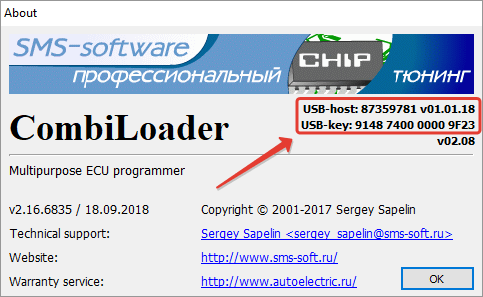
Activating additional modules requires two serial numbers: the host number and the protection key number. The host number is printed on the box with the cables and on the paper insert in the bag with the host. It consists of 8 digits. You can find the protection key number using a special program (CLFU v. 01.77) from the developer. The number consists of 16 characters. Both numbers can also be viewed in the program itself via the menu («Help» — «About») and copied to the clipboard by double-clicking. When placing an order on the site, please enter both of these numbers separated by a comma. After receiving the activation codes, select «Help» — «Enter activation code» in the program menu. Copy the code into the dialog box that appears. If you ordered several modules, the codes must be entered one by one, each separately.
The key number is printed on the paper insert in the bag with the protection key. It consists of 8 digits. The number can also be viewed in the program itself via the menu («Help» — «About»). Activating additional modules requires a so-called identifier, which you can specify right away in the order comment. You can get the identifier from the program itself via the menu («Help» — «Activate additional modules» — «I have paid for an additional module…»). After receiving the activation code, select «Help» — «Activate additional modules» in the menu, click the «Enter additional module activation code» button, copy the activation code from the email you received, paste it into the form, then click «Activate».
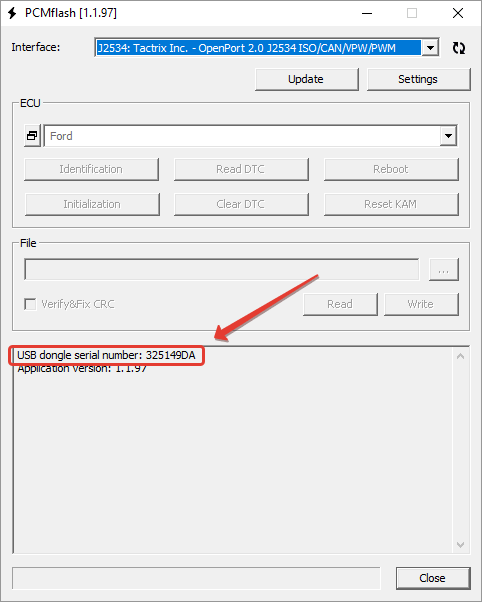
The first module after purchasing a new key is activated without a serial number, by exchanging activation codes. You can generate the code and enter the reply code with the «GrdTRU.exe» utility; the program and instructions are sent when you receive the key. Further activations are done using the serial number shown in the PCMFlash program. The number consists of 8 characters. You can enter the received code in the program settings and click the «Activation» button.
The serial number (key identifier) can be found in the program itself («Help» — «About»). The number consists of 16 characters. It is also available in the KeyManager utility («Get key information») from the ChipLoader distribution. The key is activated and licenses are added by entering the PIN code received from the seller in the «License activation» window of the same utility. In addition, you can download the KeyManager program together with the firmware for restoring the protection key, in case of problems updating the firmware, from the manufacturer’s website.
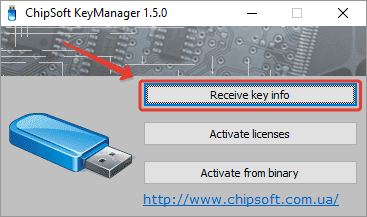
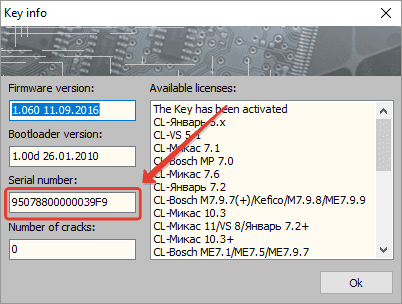
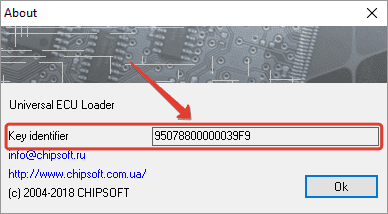
The serial number (key identifier) can be found in the program itself («Help» — «About»). The number consists of 16 characters. Licenses are activated by entering the PIN code in the window opened from the main menu («Help» — «License activation»).
A serial number is not required. Activation is done by exchanging activation codes. You can generate the code and enter the reply code with the «GrdTRU.exe» utility, located in the «USBkey» folder in the program distribution.
A serial number is not required. Activation is done by exchanging activation codes. You can generate the code and enter the reply code with the «GrdTRU.exe» utility, located in the program folder. You can also launch the utility from the program itself («Help — «Key update»).
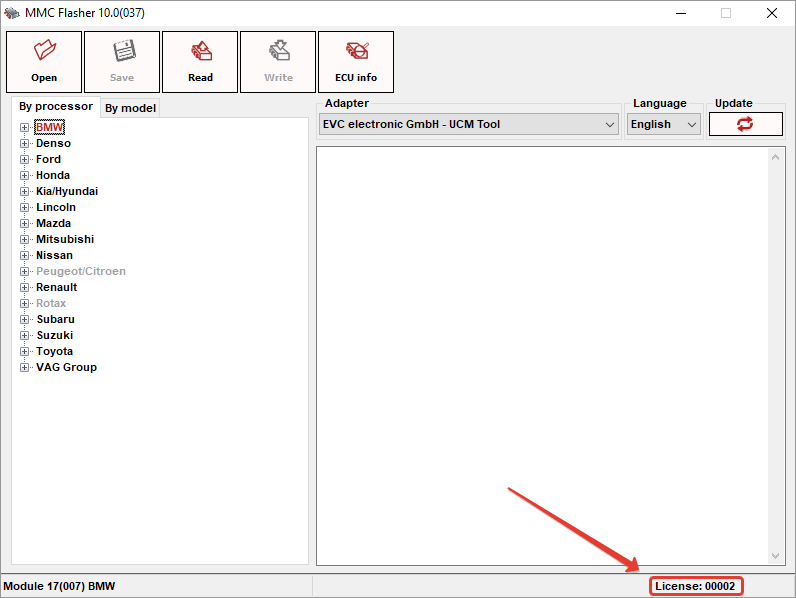
The number is usually printed on the protection key. It consists of 3–4 digits. You can also view the number in the program itself; it is shown in the main window, in the lower right corner. No activation code is required: just install the latest build of the program from the update server using the «Update» function, or download it from the special link we send you.
The key number can be viewed in the program, in the «Protection key update» window in the «Other» menu. The number consists of 16 characters. The same window has an interface for uploading the license files that you receive from us.
The serial number can be viewed in the program itself (in the lower right corner of the main window); you can also find it with the special «Senslock key ID Utility», which you can download from the official website of the software developers. The number consists of 5 characters. The list of active licenses is stored on the server and requested every time the software starts. BitBox and BitEdit can share the same protection key.
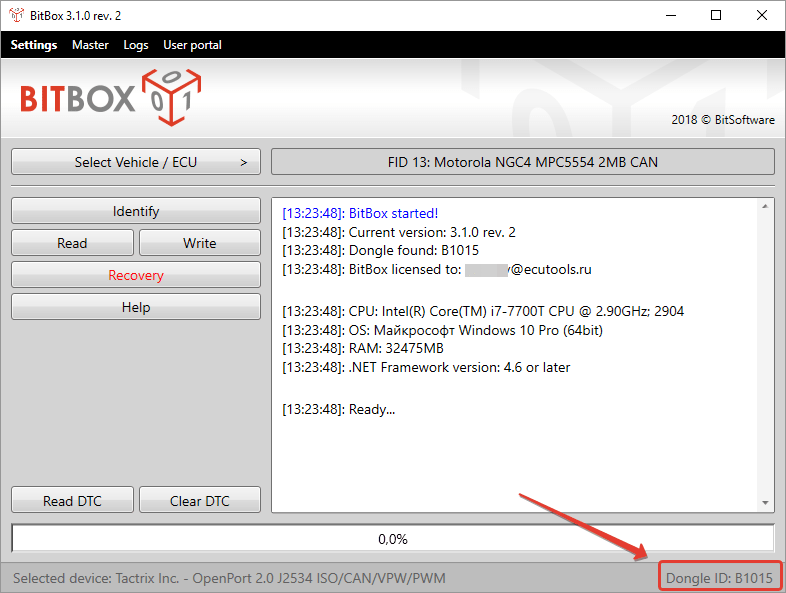
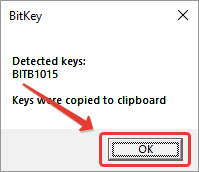
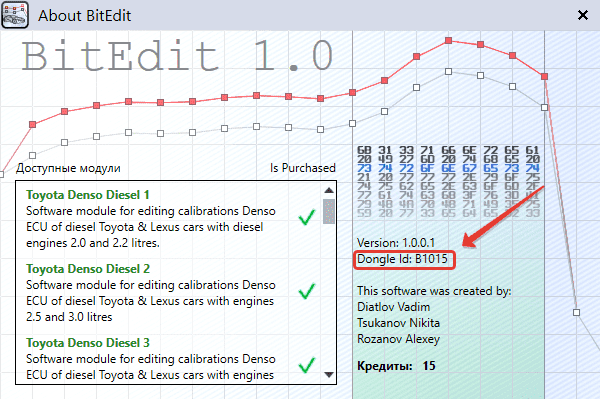
The serial number can be viewed in the program itself («About» — «About BitEdit»); you can also find it with the special «Senslock key ID Utility», which you can download from the official website of the software developers. The number consists of 5 characters. The list of active licenses is stored on the server and requested every time the software starts. BitBox and BitEdit can share the same protection key.
If you have difficulty finding the serial number of the program, you can enter a dash in the corresponding field when placing your order, describe your problem in the order comment, and we will contact you to resolve the issue.