OP-COM — a diagnostic system designed for servicing and diagnosing OPEL vehicles, consisting of two components.
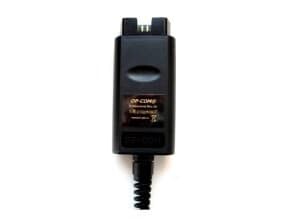
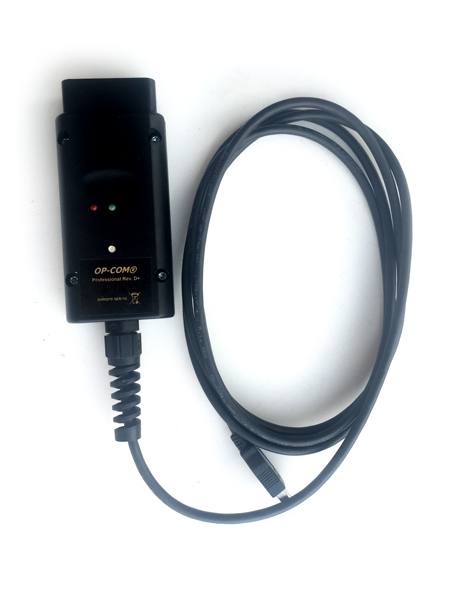
- a universal interface adapter. It is in fact a specialized microcontroller that connects on one side to the vehicle diagnostic connector and on the other to the USB port of a computer running Windows.
- the «OP-COM» program, running under Windows. The program is designed for diagnosing and controlling the electronic equipment of OPEL vehicles built after 1996.
Interface adapter.
As the system developed, the design of the adapter was also modified. The first adapters were in fact converters between the computer's COM port and the vehicle's k-line interface. It was essentially a simple passive device that could be built at home in a couple of hours. However, with the arrival of a new generation of vehicles whose on-board electronics were based on the CAN bus, the adapter was substantially redesigned and became an active multiplexer built around a microprocessor. This made it possible to move the implementation of the low-level protocols and bus switching into the adapter. The project won wide recognition not only among users but also among Chinese counterfeiters. A large wave of counterfeit products forced the development of a new version with enhanced protection.
The «OP-COM» program
The program runs under the Windows family of operating systems and comes with the necessary drivers for communicating with the adapter. Before starting work you must fill in a registration form and select the correct adapter type. Next you must go through the activation procedure. To do this, with the adapter connected and an Internet connection available, try to enter diagnostic mode. With an original adapter and a stable Internet connection, activation will happen automatically. Now you can start working.
Overview of program features
Diagnostics.
- Automatic Vehicle Identification — automatic detection of the vehicle type, VIN, engine type and other main vehicle parameters. This feature gives you general information about the vehicle without even opening the hood.
- Quick Vehicle Readout — automatic detection (scanning) of the set of electronic modules installed in the vehicle. By running this procedure you can not only see the list of all electronic modules installed in the system, but also check them for stored faults
- Fault Codes — reading and clearing faults in the units. The program shows not only the fault number but also its status, symptom byte and a short text description. You can also clear faults with inactive status from the unit's memory.
- Measuring blocks — measuring and monitoring the internal parameters of the units. The program shows the state of the sensors read by the control units and the internal state of the systems. This data is updated several times per second. It is a very powerful tool for diagnosing a vehicle's electrical equipment.
Programing — Programming and control.
- Output tests — actuator tests. The program lets the user send control commands to the unit under test and monitor how the mechanisms carry them out.
- Service procedure — running service procedures. The program performs various service procedures needed during maintenance. These include servicing the mechanisms of robotized gearboxes, and adapting and calibrating various sensors and mechanisms. You can monitor service intervals, program their values and reset them.
- Program CAN-Bus configuration - configuring the local on-board network. With the program you can correctly remove and add electronic units, program their identification parameters and bind them to the existing on-board network.
- Program variant configuration — personalization and setup of units. The operating algorithms of electronic units can be changed by software. This is how various functions are switched on and off, and how the behavior of units is changed by software according to the user's wishes and the legal requirements of the country of use.
- Immobiliser programing — working with immobilizers. The function of binding an immobilizer to control units is implemented. A function for resetting to factory parameters is also implemented. On some units the security code can be read out of the unit.
- Export data to File — exporting information. The program lets you export information about faults, sensors and states to external files, which makes it possible to process it with external programs.
Graphical data display.
- Replay previously recorded live data. — Real-time data graphs. Starting with version 120309, measured data can be shown in graphical form.
New graphical capabilities for studying OP-COM log files.
Version 121231 added further capabilities for working with the log files that OP-COM can create while running. Diagnosticians very often face the problem of needing to analyze a large number of parameters occurring at the same time. In this case a log file is recorded on the running vehicle and then analyzed at leisure. A module has been added to the new version of the program that makes it easy to work with log files, viewing them not only as tables but also as graphs.
Work with the module begins with choosing the log file type. Of course, real-time data logs are the most interesting. But fault list logs are also supported. Log files can be filtered by type or by creation date.
When viewing logs in table form, all column headings are taken from localized files and are therefore shown in the localization language. You can select four numeric parameters to study as graphs. There is no doubt that such a graphical module will help you work more efficiently with the new OP-COM.