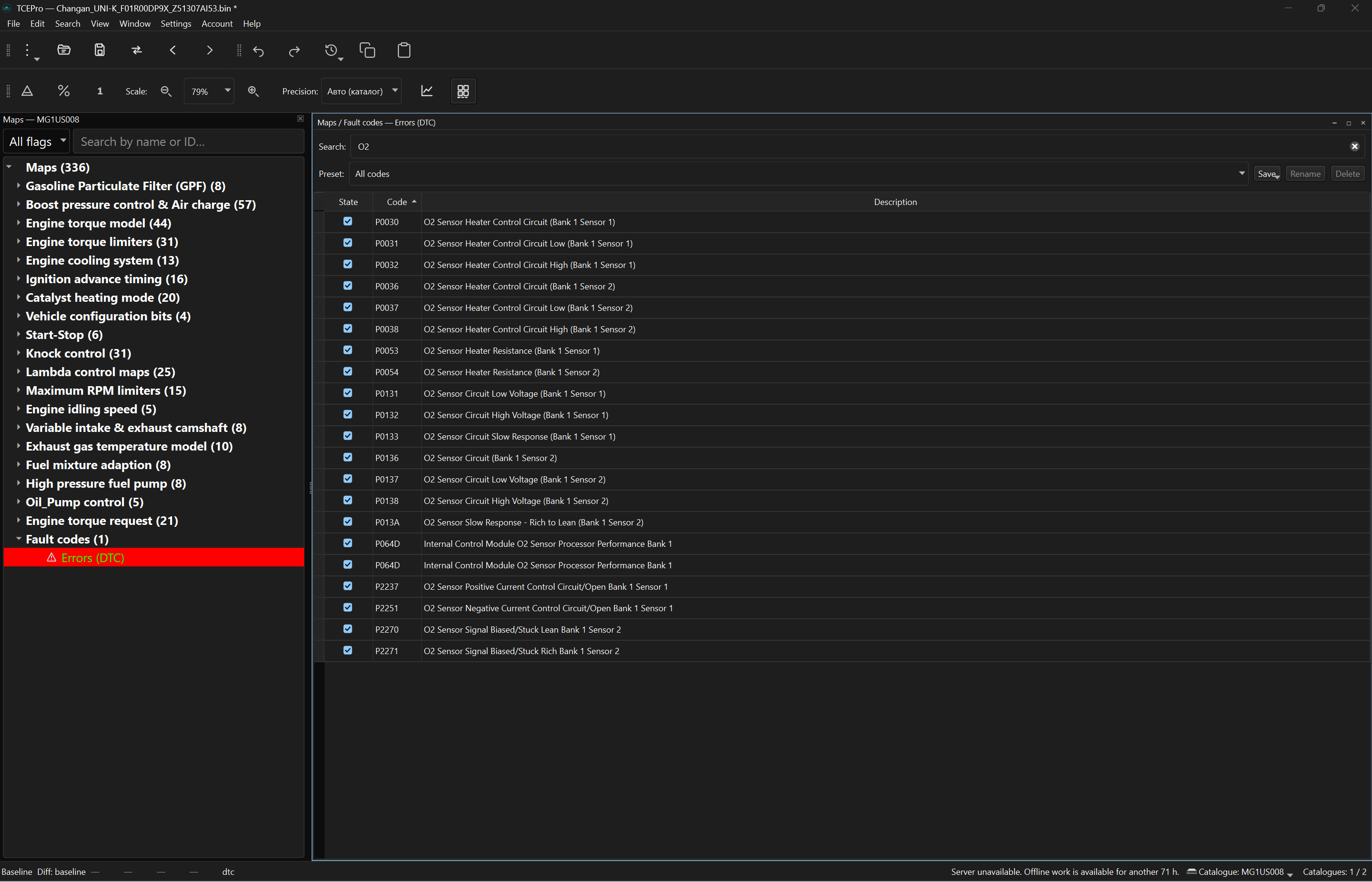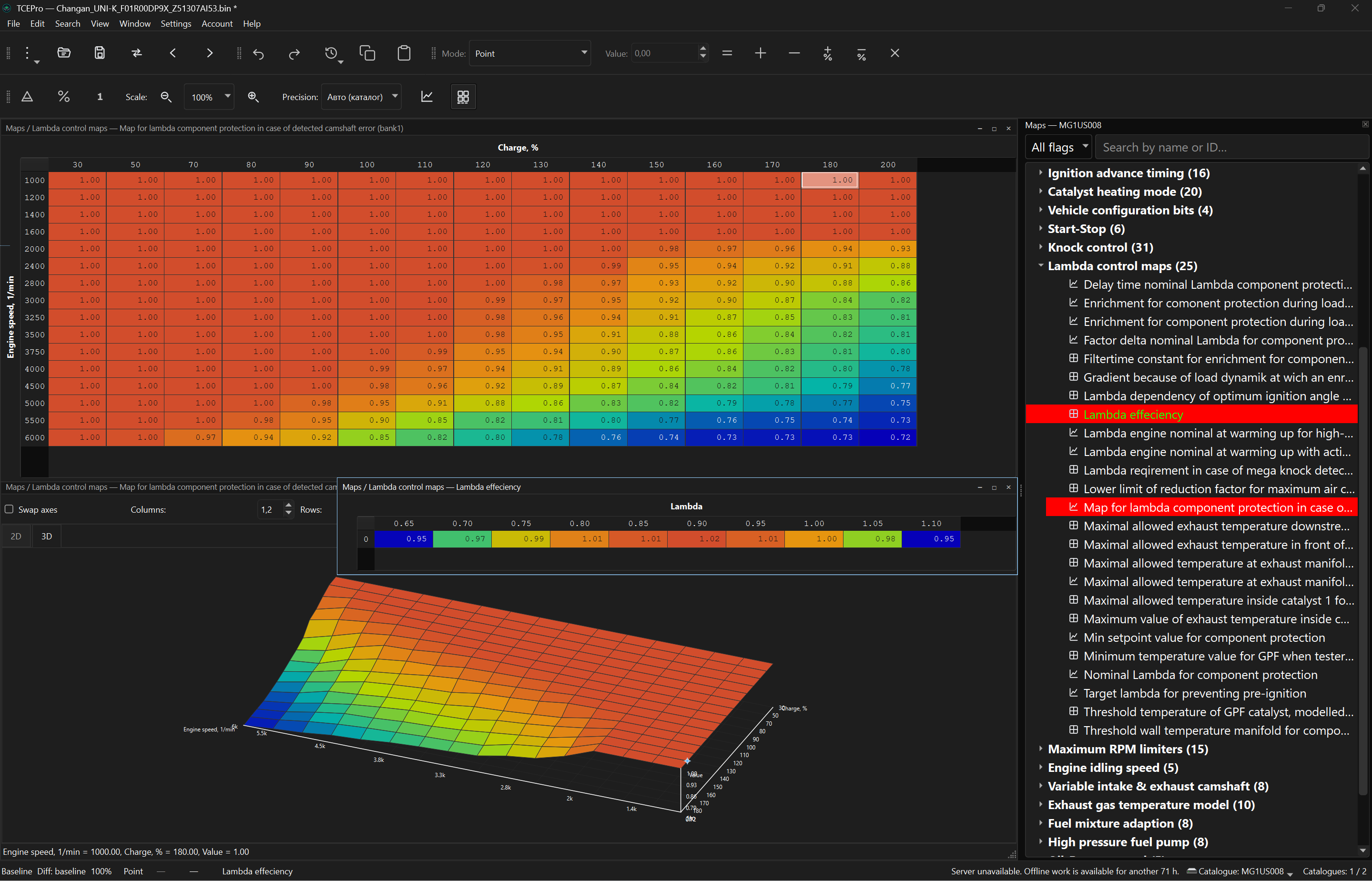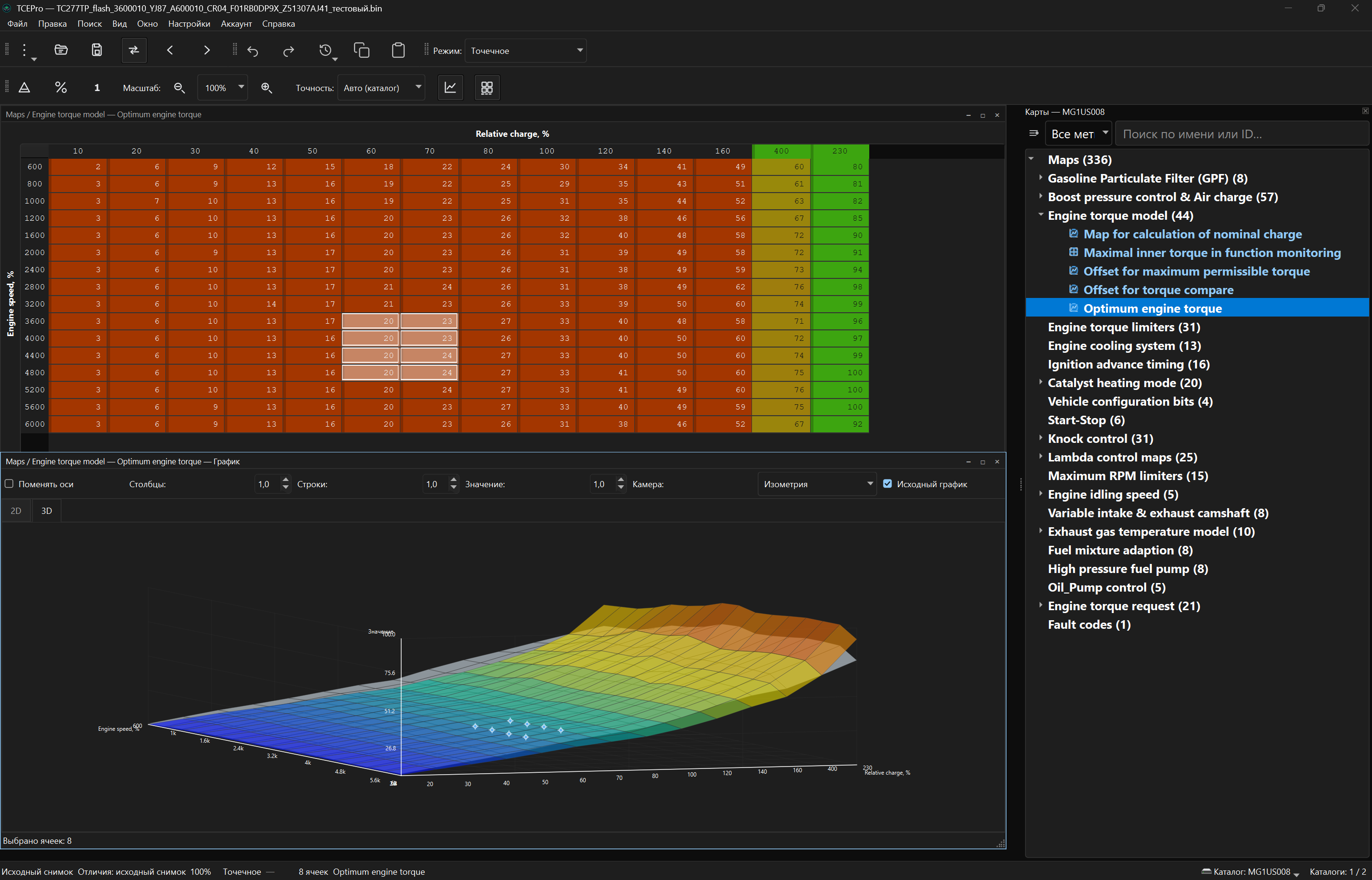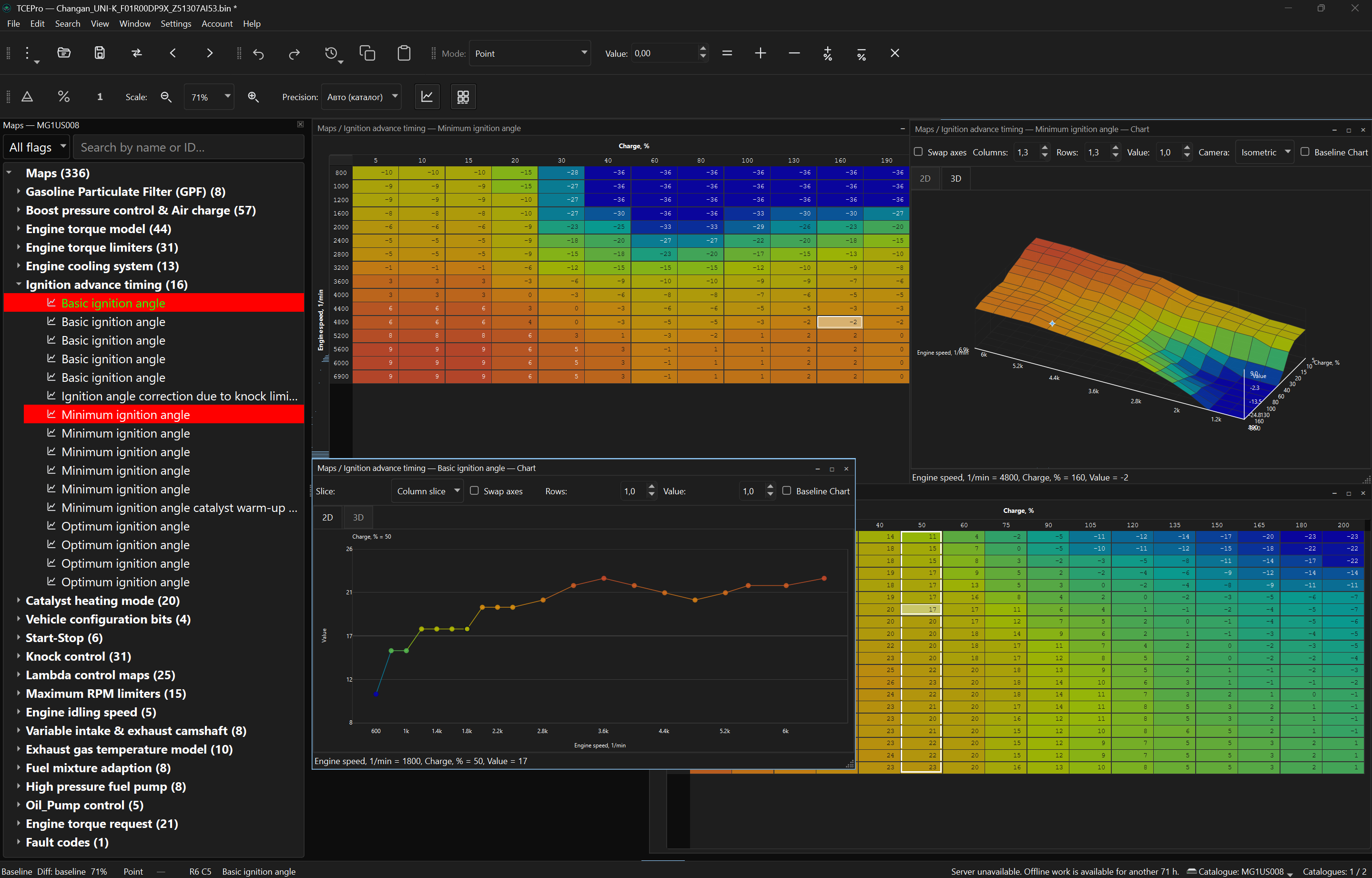


This is software only, please choose "pickup from the store".
TCEPro is a Windows application that does the most painstaking part of the job: it finds the maps inside a firmware file, shows them as a table and a chart in real units — degrees, revolutions per minute, milligrams — and lets you change them — every change can be undone.
Maps are not built into the program. You obtain access to the catalogs you need, the program downloads them itself, and from then on it is automatic: open a firmware file and its maps appear.
What TCEPro does
Finds the maps for you
Drag a .bin, .rom or .mod file in — the unit is recognized and a map tree with names and units appears. Nothing to type, no catalog to pick.
Real units, table and chart
Line, surface or 3D charts next to the table in degrees, rpm and milligrams. A selection in one is highlighted in the other.
Editing you can undo
Bulk operations, smoothing and scaling — every action can be undone or returned to the original. The source file is never overwritten.
Compare and carry over
See only what changed between two firmware files and carry differences across — a whole map, changed maps or selected cells.
Projects and export
A project keeps firmware, edits and history together. On export, checksums are recalculated for supported Bosch, VAG and Mercedes-Benz units.
Crash recovery
Unsaved edits are snapshotted while you work — after a crash TCEPro restores the firmware, edits and window layout.
How to get access
- Buy the catalog from a dealer. Each catalog is bought separately.
- The purchase is linked to your email. Without an account yet, you get an email to set a password.
- Install TCEPro and sign in with that account. Your license turns on with the first catalog you buy.
- The catalog downloads in TCEPro automatically.
FAQ
How many PCs can I use?
A license occupies one device slot by default. The catalog opens only in TCEPro on that PC with your account.
Can I work offline?
Yes, up to 3 days. Projects stay on this PC and follow the same slot-bound license.
What happens when my offline lease expires?
TCEPro shows a warning as the 3-day lease runs out. Sign in again to extend it.
Do I lose my projects if access is revoked?
Projects remain on your PC. The licensed catalog stops opening after the next check-in.
Does TCEPro program the ECU?
No. You flash the exported file with your usual equipment. TCEPro recalculates checksums automatically for supported Bosch, Volkswagen Group (VAG) and Mercedes-Benz units and shows a warning for the others, including Bosch MG1US008.
Which firmware files does it open?
.bin, .rom and .mod files, from the menu or by drag-and-drop. The unit is recognized automatically across the catalogs you have access to.
What languages and themes are available?
English (default), Russian and Spanish. Light, dark and system themes, chart color schemes, a color-blind-friendly difference palette and customizable shortcuts.
My ECU or car is not supported. What can I do?
Send the firmware file for analysis through Catalog research in your cabinet. New vehicles and software versions of a supported ECU are added to its catalog; an ECU that no catalog covers yet becomes a separate catalog with its own price. Available after your first catalog purchase.
The technical support is provided by the developer directly.
Open Bosch MG1US008 firmware from Changan, Chery, EXEED, JAECOO, JETOUR, Haval, GWM TANK, Geely and other vehicles in TCEPro and work with its calibration maps as tables and charts in real units. The catalog is licensed to your account and one PC.
About the MG1US008 unit
MG1US008 is a variant of the Bosch MG1 family of engine control units. The catalog covers MG1US008 firmware from 23 vehicle models across 14 brands, including cars with Chery F4J16C (1.6T) and F4J20 (2.0T) engines.
Vehicles with the MG1US008 unit
- Changan CS35 Plus
- Changan Hunter
- Changan UNI-K
- Changan UNI-T
- Changan UNI-V
- Chery Arrizo 8
- Dongfeng Fengon iX7
- Dongfeng Yixuan MAX
- EXEED TXL
- EXEED VX
- FAW Bestune T77
- Geely Atlas
- GWM TANK 300
- GWM TANK 400
- Haval Dargo
- Haval F7
- Haval H9
- Hongqi HS5
- JAC T9 (Sollers ST9)
- JAECOO J7
- JETOUR T2
- Kaiyi X7
- Sinotruk VGV
Not every version of these models uses MG1US008: depending on engine, year and market, a vehicle may have a different unit. TCEPro recognizes the unit from the firmware file itself — if the file comes from an MG1US008 unit, it opens with this catalog.
Your vehicle or software version is not listed?
If your ECU is MG1US008 but its firmware does not open with this catalog, send the file for analysis through Catalog research in your cabinet. New vehicles and software versions of MG1US008 are added to this catalog; firmware from a different ECU becomes a separate catalog with its own price. Available after your first catalog purchase; files up to 10 MB.
What the catalog gives you in TCEPro
- Automatic recognition. Open a .bin, .rom or .mod file read from an MG1US008 unit — TCEPro recognizes it, with no catalog to pick. The Identification panel shows the make, unit supplier, family, versions and recognition confidence.
- A named map tree. Maps appear with names and units in a searchable tree with color tags.
- Tables and charts in real units. Degrees, rpm, milligrams — with line, surface and 3D charts next to the table.
- Compare and carry over. Compare two MG1US008 files, see only the changed maps and carry differences across — a whole map, all changed maps or selected cells.
- Export. Export writes a new file and does not overwrite the source. Checksums for MG1US008 are not recalculated yet: TCEPro shows a warning on export, so correct the checksum with your usual tool before flashing. Automatic recalculation for this unit is planned.
What you need
- A 64-bit Windows 10 or 11 PC.
- An account on this site with access to the MG1US008 catalog.
- A firmware file read from the unit with your usual equipment — TCEPro does not read or program the ECU.
How to get access
- Buy the MG1US008 catalog from a dealer. The purchase is linked to your email; without an account yet, you get an email to set a password.
- Install TCEPro and sign in with that account.
- Open an MG1US008 firmware file — TCEPro recognizes the unit.
- The catalog downloads automatically and stays available offline for up to 3 days between